Google Launches Genie 4 Real-Time World Model on Gemini API and AI Studio
Developers can generate interactive 720p 24fps worlds from text or images and control them in real time with WASD, prompts, and 48 kHz stereo audio
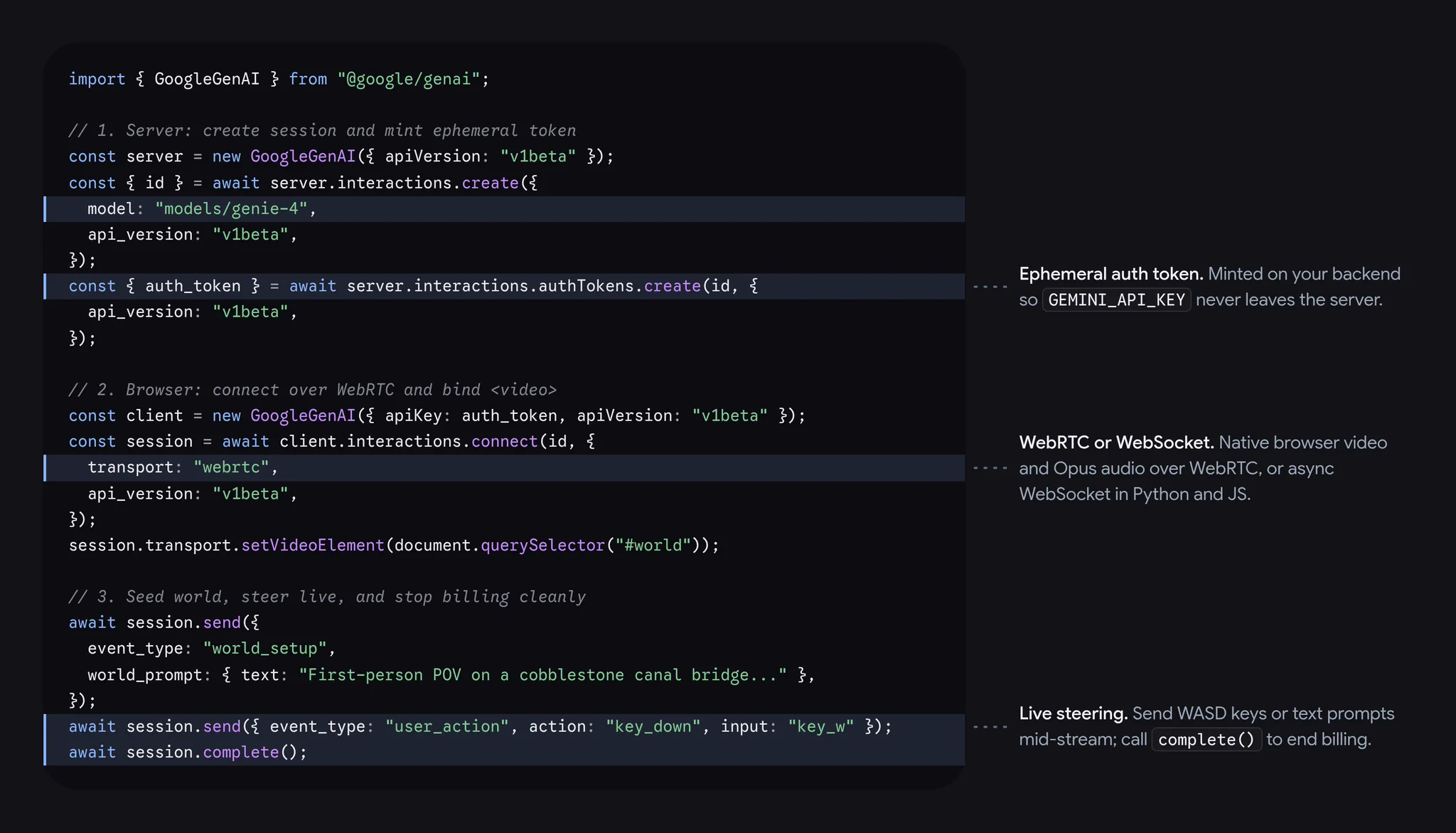
Table of Contents (3)
Key Takeaways (TL;DR)
- 01Genie 4 is now available on the Gemini API and AI Studio as a real-time controllable world model
- 02It outputs 720p at 24fps, accepts text or images as initial seeds, and is controlled with WASD, prompts, and 48 kHz stereo audio
- 03Streaming is offered via WebRTC (browser with ephemeral tokens) and WebSocket, with documentation released alongside the launch
Philipp Schmid of the Google DeepMind developer experience team announced that Genie 4 is now available on the Gemini API and AI Studio. Developers can generate 720p 24fps worlds from text or images and control them in real time with WASD, prompts, and 48 kHz stereo audio, streamed via WebRTC or WebSocket.
Genie 4 Lands on Gemini API and AI Studio: From Generated Frames to Real-Time Control
Philipp Schmid of the Google DeepMind developer experience team disclosed on social media that Genie 4 is rolling out on the Gemini API and AI Studio. According to his account, developers can use a piece of text or an image as a seed to generate a 720p, 24fps world and control it in real time while it runs, rather than merely outputting a fixed clip. This positioning pushes world models from demonstrative generation toward interactive runtime environments.
Unlike typical video generation, Genie 4 emphasizes the act of real-time control: users move with WASD, adjust the scene's direction with prompts, and overlay 48 kHz stereo audio. Schmid also provided two access points, the Gemini API and AI Studio, along with a link to the AI Studio documentation for developers to consult specific usage details.
"Seed a 720p 24fps world from text or image and steer it live with WASD, prompts, and 48 kHz stereo audio." — Philipp Schmid
- Seed input: text or image
- Output specs: interactive world at 720p, 24fps
- Controls: WASD, prompts, and 48 kHz stereo audio
- Access points: Gemini API and AI Studio
Two Streaming Paths: WebRTC and WebSocket
On the transport layer, Schmid said Genie 4 can be streamed via WebRTC or WebSocket. The WebRTC option targets browser scenarios and works with ephemeral tokens, meaning developers can establish sessions without storing long-term credentials on the client; WebSocket offers another access option, allowing teams with different tech stacks to choose according to their architecture.
This combination places the barrier to real-time interaction on browsers and standard network protocols rather than requiring specialized hardware or on-premises deployment. For teams looking to quickly validate real-time world model experiences, the clarity of the access path often affects evaluation pace more than raw image-quality metrics.
The Trade-offs Behind the Specs: What 720p 24fps and Audio Sync Mean
720p and 24fps form a conservative but stable spec combination. For real-time interaction, frame-rate stability usually affects control feel more directly than per-frame resolution; 24fps is close to the frame rate commonly used in film and television and is relatively easy to maintain as coherent output under browser streaming conditions. Schmid did not disclose details such as latency, concurrency, or pricing, and developers will still need to test these metrics themselves.
The inclusion of 48 kHz stereo audio is noteworthy. It indicates that Genie 4's output goes beyond visual frames and brings sound into the same real-time session, which has practical significance for immersive experiences and interactive content production. However, how audio and video are synchronized and which end handles mixing have not yet been explained in the available public information.
The evaluation focus for real-time world models is shifting from "does it generate convincingly?" to "can control keep up?"
- 720p 24fps: a spec oriented toward stable, coherent real-time output
- 48 kHz stereo: audio and video within the same real-time session
- Latency, concurrency, and pricing: not disclosed publicly; developers need to test
What It Means for Developers: From Model Capability to Integration Cost
The key information in this launch is not parameter scale but the simultaneous disclosure of access methods and key specs. Developers can use this to assess the engineering effort of embedding Genie 4 into real-time interactive scenarios: whether to use a browser front end and establish sessions with WebRTC, or to go through WebSocket and integrate with existing server architectures. The two paths correspond to different authentication and operations arrangements.
The ephemeral token design also hints at security boundaries: credentials are valid only briefly with the session, making it suitable for browser applications aimed at end users. For development teams in the Asia-Pacific region, existing habits around the Gemini API and AI Studio can extend directly to this new capability, reducing additional learning costs, though the actual experience will still depend on network conditions and streaming stability.
The access paths are clear; the remaining variables are latency, cost, and scenario fit.
- Browser front ends can prioritize evaluating the WebRTC plus ephemeral token approach
- Server-side integration can evaluate the WebSocket path
- In the early launch period, small-scale testing should verify latency and stability
Impact
Industry Impact & Strategic Takeaways
Genie 4's arrival on the Gemini API and AI Studio turns real-time world models from research demos into callable developer capabilities, while offering two streaming paths, WebRTC and WebSocket. For the global and Asia-Pacific AI industry, this means another Google option when choosing real-time interactive scenarios, and the competitive focus will shift from image-generation quality to latency, control responsiveness, and integration cost. Since latency and pricing have not been disclosed, it is more likely to appear first in prototype validation and content experiments in the near term rather than large-scale production deployments.
Frequently Asked Questions
Where can Genie 4 be used currently?
+
According to Philipp Schmid of the Google DeepMind developer experience team, Genie 4 is rolling out on the Gemini API and AI Studio, with documentation links on the AI Studio side for developers to consult.
What inputs and controls does Genie 4 support?
+
It can generate 720p 24fps worlds from text or images as seeds and be controlled in real time with WASD, prompts, and 48 kHz stereo audio; streaming can be done via WebRTC (browser with ephemeral tokens) or WebSocket.
Have Genie 4's latency and pricing been announced?
+
Available public information covers only specs and access methods, with no details on latency, concurrency, or pricing; developers need to test and evaluate these themselves.
Primary Source & Attribution
X:Philipp Schmid(Google DeepMind 开发者体验) (@_philschmid)
Today we are rolling out Genie 4 on the Gemini API and AI Studio🚀
Related Deep Dives
Google DeepMind Opens New Project Genie Experience to AI Ultra Subscribers, Debuting Genie 4 World Model
69 pts · 5 min read
Google Brings Gemini 4 Hydrogen to Global Search, Calling It the Largest Model Upgrade Yet
66 pts · 5 min read
Google Workspace MCP servers and gwscli reach GA, Personal mode enables one-click setup with no credit card required
73 pts · 5 min read

Gemini for Mac Launches Computer Use: Agent Can Execute Tasks Across Apps While Users Retain Control
71 pts · 5 min read